Customer Relationship Management

Learn everything you need to know about CRM and why it is crucial for your business.

What is CRM ?

CRM software is a technology that helps you manage your relationship with customers. It is a centralized platform where you can store the entire data about your current customers and potential leads. Businesses can draw valuable insights into customer behavior using such online CRM data.

Sales CRM software helps your sales team map out your customer's journey with the business. You can gain control over the customer journey and provide necessary support at each touchpoint.

Apart from these basic features, today, some of the best CRM software tools are designed to scale with your business. Developers update the CRM tool regularly to develop more advanced features as per the size and requirements of businesses.

What is CRM Software?

CRM software is a technology that helps you manage your relationship with customers. It is a centralized platform where you can store the entire data about your current customers and potential leads. Businesses can draw valuable insights into customer behavior using such online CRM data.

Sales CRM software helps your sales team map out your customer’s journey with the business. You can gain control over the customer journey and provide necessary support at each touchpoint. Apart from these basic features, today, some of the best CRM software tools are designed to scale with your business. Developers update the CRM tool regularly to develop more advanced features as per the size and requirements of businesses.

Types of CRM Software

There are different types of CRM software that cater to the needs of various businesses. For instance, CRM software for small businesses may focus on providing an easy-to-use interface with basic features to fit in with the budget.

On the other hand, giant companies may need CRM software types that offer advanced features like in-built analytics, integrations, AI-driven insights, etc. Check out the various types of CRM software tools that you can consider:

Strategic CRM

Strategic CRM is an online CRM software perfect for businesses aiming to have an everlasting customer relationship. It analyzes customer data and infers valuable insights about customer behavior just like analytical CRM.

Analytical CRM

is software that helps you sort and handle large chunks of data more easily. It even presents in-depth insights from the data stored. Therefore, it is mainly used by large business organizations with tremendous amounts of data to analyze.

Collaborative CRM

Collaborative CRM is yet another helpful tool for large businesses in improving the collaboration between the various departments and employees of an organization. It is also useful in optimizing customer interactions through features to respond to their queries automatically.

Operational CRM

Operational CRM is one of the most common and widely used CRM software types. Its main aim is to optimize business operations using customer data. Business teams can better understand customer needs through an operational CRM and eventually serve them better.

How does CRM work?

CRM works by centralizing data from various sources to a single platform. After collecting such data, it offers in-built analytic reports to provide insights about customer preferences, behaviors, interests, etc. As a result, businesses can identify mistakes and take a step ahead of their competitors to offer services that lead to customer satisfaction.

It gives you a bird’s eye view of all the business activities, from lead nurturing to query support. You can use it to manage customer interactions and optimize communication channels to close deals quickly. Some advanced customer relationship management (CRM) tools also offer integration opportunities and automate routine business tasks like data entry, analysis, etc.

Features of CRM

CRM is emerging as an integral part of modern businesses. As per stats, 91% of businesses with over 10 employees use CRM features to manage their operations. Here are some basic features of CRM:

Lead Management 

Lead management is a CRM software feature that helps you view all your leads in one unified platform. It optimizes the process and boost conversion rates.

Some CRM features like lead scores and automatic assignments features help you to get a competitive edge.

Sales Tracking

Sales tracking helps keep an eye on each step of the customer’s journey through the sales pipeline.

If the customer gets stuck, sales executives can contact them instantly to avoid obstacles and optimize the journey.

Collaboration and Communication 

CRM software acts as a centralized platform for cross-departmental communication and collaboration by offering email services, in-built chats and comments, automatic reminders, notifications, etc.

All the team members can access centralized data and understand the customer better.

Integrations

Businesses can save time and effort by connecting CRM systems with third-party software to automate tasks like payroll entry, data typing, etc.

Employees can reduce time spent on routine administrative tasks and focus more on core activities.

Marketing Campaigns 

CRM software lets you have a bird-eye view of all the marketing campaigns.

You can increase the Return on Investment (ROI) of campaigns by planning and tracking targeted email campaigns using valuable data.

Data Analysis 

CRM software collects data from various sources and delivers valuable insights by analyzing customer data.

It helps businesses identify trends in the widespread data to guide them in making informed decisions.

Contact Management 

With CRM, you can run effective contact management and stay updated with the customer details. This helps to provide better support to customers and prevent customer burnout.

You can deliver personalized messages to customers by segmenting them.

Who uses CRM software?

Customer relationship management software is helpful for any business. Most CRM tools are built to be flexible and cater to the needs of various kinds of users. However, they are mainly used by some departments and industries for maximized results. Read on to know who uses CRM:

Sales

CRM software provides sales teams with a structured client database for them to access the necessary information in their hour of need. They can track the customer at each point of the sales point and ensure proper follow-ups to close the deals efficiently. CRM also acts as a trusted source for the team lead to monitor the performance of each executive closely to distribute rewards accurately.

Marketing

Marketing teams usually use CRM software to improve the efficiency of their marketing campaigns. But how? Well, CRM uses its data storing and analytics capabilities to help them efficiently segment their customers. This way, the marketing team can prepare personalized messages and targeted campaigns for each section of the audience. As a result, the ROI and conversion rates will shoot up.

Customer Service

Customer service teams use CRM to manage their interactions with customers. It keeps data about customer issues, chat history, etc. That means in case of transfer of a customer query, customer service executives can know the context easily without asking the customer to explain the issue again. Moreover, CRM systems notify the team instantly when messages are sent on any channel.

How do Sales and Marketing teams use CRM? 

Customer Relationship Management (CRM) software serves as a collaboration platform for both sales and marketing. Sales teams get notified when the leads are uploaded to the platform, along with the necessary information. Some CRM tools provide the feature to assign lead scores through which the marketing team can gather feedback about lead quality. 
Above all these, a CRM is a centralized platform for a business that stores all the data of the company. Both sales and marketing teams can access any information without communication gaps. They can even share large files easily through a CRM. 

Top Industries Using CRM

Retail

Retail owners depend on CRM software systems to identify the pulse of the target audience and their shopping patterns through rich data.

Infact, the retail industry is the largest user of CRM software with almost 18% firms using it.

Banking and Finance

The finance industry is overwhelmed with client data and uses CRM to handle it effectively.

Financial companies using CRM can have an overview of customers’ portfolios and quickly identify cross-selling or upselling opportunities.

Manufacturing

Manufacturing is yet another industry that handles tonnes of data daily. CRM software can turn raw data into actionable insights to improve the product.

It helps them to reduce paperwork and create a unified platform to manage the supply chain processes.

E-commerce

E-commerce companies use CRM software as a centralized repository to manage customer data. They analyze such data to better understand their customers, provide relevant suggestions and boost retention rates.

E-com companies using CRM integrate it with order management and inventory systems for efficient order tracking.

Real Estate

Real estate companies using CRM can track all their deals effectively to ensure proper nurturing and follow-ups.

Some companies take a step ahead by integrating CRM systems with Multiple Listing Services (MLS) databases to import property listings instantly.

Benefits of CRM and why your business needs it

The average ROI for CRM spending is $8.71 for every dollar spent.

Companies using CRM achieve a 50% increase in sales productivity.

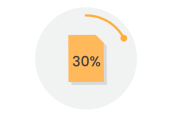
30% of companies agree that CRM improves their reporting abilities.

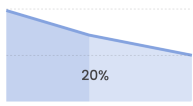
Companies with CRM software cut their labor costs by 20%.

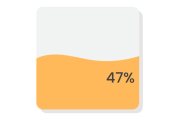
47% of companies reported CRM improved customer satisfaction and retention.

Companies using CRM reported a 300% increase in conversion rates.

CRM software is nowadays a basic essential for all businesses, from newborn start-ups to established companies. So, what makes it so popular? Well, check out some CRM benefits:

CRM software lets you have valuable data about customer interests at your disposal. You can improve your business service by tailoring it to customer preferences. 
One of the top benefits of CRM is that it helps you keep a close eye on lead updates, from uploading them to closing the deals. As a result, sales teams can effectively nurture the leads and optimize the conversion channel to increase sales.
83% of online shoppers need help to complete a purchase, making customer care support a crucial factor. Fortunately, CRM lets you track customer contacts in real-time to provide instant and personalized responses to their queries. This way, customer retention rates will be kept to a minimum. 
CRM lets you analyze vast amounts of in-depth data to make crucial decisions on time without much delay. Onstro CRM offers such in-built analytical features to understand your targeted audiences' behavior better.
You can automate routine administrative processes to free up your employees' time, which is one of the biggest advantages of CRM. This helps them to focus more on core tasks. For example, the automatic lead-assigning feature of CRM relaxes team leaders from the routine job of assigning the leads to the right executives. 

5 Risks of Not Having A CRM for your business

After considering the cost and effort, a fair question may arise: do businesses really need CRM software? Well, it’s not just the CRM implementation that will cost you, not using a CRM will cost you more. How? Here are some disadvantages of not using a CRM:

Inefficient Work Tracking

Online CRM gives you access to a single platform to monitor the entire performance. Without a CRM, it becomes difficult to track the work and stay updated with the progress.

Delayed Responses

Giving instant responses and ensuring proper feedback will be more difficult without a CRM system. Eventually, customers may end up leaving the brand.

Communication Issues

The communication gap between different teams, especially between sales and marketing, may widen without a business CRM. This may even lead to some conflicts.

Difficulty accessing data

If data is stored on multiple platforms, accessing specific data when required becomes difficult. As a result, your decision-making process gets delayed, and thus, your competitors may capitalize on an opportunity quickly.

Lack of Focus

Certain routine administrative jobs that could be automated through a CRM may continue to take a toll on the valuable energy and effort of the employees. As a result, they may not be able to focus on their work properly.

How to Implement a CRM?

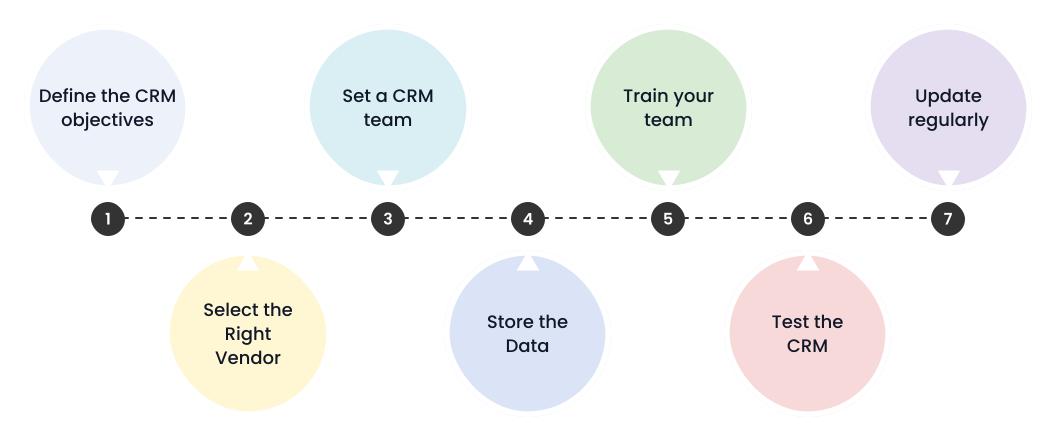
CRM implementation refers to the process of installing CRM software in a business. Lack of a robust implementation plan is often the root cause of many CRM failures. Here are the 7 crucial CRM implementation steps:

Define the CRM objectives
The first step in the CRM implementation process is to define the objectives of CRM. Answer core questions like: what problems do you aim to solve through a CRM? What results do you expect from it? For instance, if you are an e-commerce startup, your priority would be to optimize the order management process through CRM integrations. 
Select the Right Vendor
You can opt for an off-the-shelf CRM solution to begin with. Alternatively, you can also create your own CRM from scratch for a higher degree of customization. Either way, you must find the right service provider for a better CRM implementation process. For that, consider the software companies with the best track record and request quotations from them. Then, pick the most suitable IT partner after considering all major factors like experience, expertise, cost, etc. 
Set a CRM team
Assemble a team of skilled employees to manage CRM software implementation effectively. Ensure you have representatives from diverse departments like Sales, Marketing, IT, etc. You can hire experts from outside to optimize the process if needed. 
Store the Data
CRM results are maximized if you store the right data. So, you must gather data from multiple sources and store it in your CRM. It is better to use data migration tools like Google Cloud, AWS Data Migration, Integrate.io, etc., to avoid the hassle of manual data entry.  Moreover, set appropriate data handling permissions for various team members. It's crucial to strike a balance – avoiding overly strict restrictions that could delay operations and preventing excessive liberality that could lead to information overload. 
Train your team
Training your team on when and how to use the software is crucial in implementing customer relationship management software. Make sure that the team members are well-trained on the core features of CRM, like data segmentation, lead assignment, reporting, etc. Training must be tailored to the unique needs of each department. 
Test the CRM 
It's always better to test the CRM setup with a selected group of employees from different departments before planning a full-fledged launch. Identify any errors or potential mistakes in the CRM implementation process. Launch the CRM to everyone only after all such errors are rectified. 
Update regularly
As time moves on, update the two main streams of the CRM regularly: database and features. Ensure the data stored in CRM remains fresh and updated on time. And try to roll out new advanced features to the software as your business grows to improve the results. 

Challenges of Implementing CRM Software

As per stats, about one-third of CRM software projects fail. But why? Well, companies face many challenges in the CRM execution process. Here are some of the main CRM challenges:

Communication Gap

Excessive power for the IT team while implementing CRM decisions often backfires. The communication gap between different departments may affect the implementation process. As a result, the sales and marketing team’s needs may not be addressed.

Less Integrations and Time

Some CRMs might be difficult to integrate with the current workflows or tools used by the company. The failure to allocate enough time and resources to smoothen the transition process is one of the major challenges of CRM implementation.

Employee Mentality

Major CRM implementation decisions are often taken by top-level management. Most probably, some employees may be resistant to changes. It takes time to make them understand the benefits of CRM and how to use it.

Here’s How to craft the best CRM strategy

Figure out and tailor a customer relationship strategy to achieve goals.

Set a precise target audience and collect data like interests, behavior, etc.

Outline a roadmap of the customer journey focusing on communication.

Establish clear KPIs to measure the efficiency of the CRM solution.

Track CRM processes and focus on improving efficiency and ROI.

3 Best CRM Software for your business

Choosing the best CRM software is challenging as the number of options in the market continues to shoot up. Businesses must do in-depth research to find the software with the right features that align with their goals. Check out the 3 best Customer Relationship Management tools that could be considered for your business:

Onstro CRM is an all-in-one software platform that lets you manage all your business contacts and teams on a centalized platform from anywhere. You can expand each contact and view their detailed information with just a click.

It enables you to track the progress of each lead and move them manually through various stages of the conversion. And, that’s not the end. You can stay updated with an in-depth overview of all lists, activities, workflows, and more.

SalesForce is one of the top CRM tools suitable for businesses of all sizes. It comes up with a set of advanced features for all the departments of a business. You can integrate the sales CRM with almost all daily-used third-party apps to optimize the entire business activities.

Hubspot is another widely used online CRM software focusing mainly on inbound marketing and sales processes. It is particularly popular among small and medium-sized businesses due to its user-friendly interface.

Top 5 Factors to Consider While Choosing a CRM

Choosing the best CRM software is challenging as the number of options in the market continues to shoot up. Businesses must do in-depth research to find the software with the right features that align with their goals. Check out the 3 best Customer Relationship Management tools that could be considered for your business:

Integrations

Executing a new technology could be painful if it fails to accommodate your current system. Therefore, go for software that integrates with your current applications, like Microsoft Outlook, Excel, etc.

Support

Since you are dealing with technology to be used in the long run, an efficient support system is a basic requirement when choosing CRM software. So, ensure an ongoing support system is mentioned in the vendor contract.

Scalability

As businesses grow, their priorities and needs may change. It may not be feasible to change CRM software at each stage of expansion as it costs considerable cost and time. To avoid that, always select CRM software that scales with your business. Choose the service providers that regularly add new features and updates to the software.

Easy-to-use

Some CRM tools come up with a lot of advanced features that are arranged in a clumsy interface. Users need to have in-depth technical knowledge to use all the features of such tools. Therefore, always consider testing CRM software with a free trial while searching for it. Check out whether the software interface is easy or complex.

Reporting Capabilities

Most companies set up CRM software to track their employee productivity. Large-scale businesses with various departments require a CRM system that offers insights into the overall performance through detailed daily reports. If the software could present the data in a visualized manner, it would be much easier to analyze.

How much does CRM implementation cost?

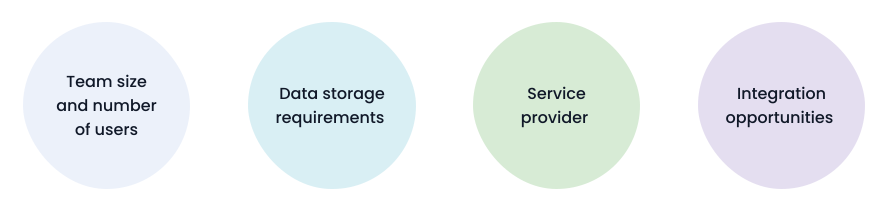
The cost of implementing CRM mainly depends on your requirements. Here are some factors that influence the CRM cost:

Generally, small businesses start with CRM at just $7 per user per month. However, the cost may be as high as $67 (single user per month) for a top CRM that includes all the features. On top of these monthly subscriptions, there are many hidden costs regarding data migration, training, etc.

The costs will be much higher if your company wants to build a custom CRM from scratch to ensure data privacy. Considering the hourly rates of a skilled web developer ($35-40), the cost would be around $110,000. Keep in mind that this is just a one-time cost to set up the custom CRM. Maintenance and development costs come separately.

CRM Best Practices

Customer relationship management software tools have been a strong presence in the business sector for over a decade. But still many companies fail to use it in the right manner and to its full potential. Here, we have curated a list of CRM best practices to maximize CRM output:

Ensure Clear Goals 

Make sure that the reason why you set up a CRM is crystal clear. If possible, express it through Key Performance Indicators (KPIs) like customer retention rates, lead conversion rate, average purchase value, customer lifetime value, and sales metrics. Set up a meeting with the stakeholders to finalize the CRM goals.

Select the right CRM software 

As mentioned earlier, different CRM software delivers unique solutions. For example, sales-oriented CRMs help your business track the lead nurturing process and boost the lead conversion rate. However, marketing CRMs focus on optimizing marketing operations through automation. Therefore, it is crucial to choose the most suitable software that fits in with your needs.

Train your teams 

Most CRM solutions are quite technical in nature and may have a learning curve. Businesses need to provide in-depth training to employees on CRM data management best practices. Always continue the CRM training process as new employees are onboarded and new features are added.

Automate the Workflow 

Automation is one of the main Unique Selling Propositions (USPs) of a CRM. Therefore, figure out some routine tasks that take up a lot of time and check whether they can be automated. For instance, CRM can automatically assign scores to leads based on their interactions, helping sales teams prioritize high-potential prospects. Companies with best CRM practices not only save time but also improve the efficiency of their operations.

Update the CRM 

Setting up CRM software is not a one-time process. As your business grows, add more features to the software to meet the rising requirements. It is always better to audit the system regularly to identify any defects. Moreover, update the databases of the CRM platform regularly to get the most in-depth insights.

Future of AI in CRM

Many businesses are pumping millions to research the usage of advanced AI in CRM to stay ahead of the competition. As per stats, 51% of sales leaders believe AI affects their CRM strategies. For instance, AI can quickly analyze vast amounts of customer data and provide them with more relevant suggestions.

The future of CRM looks promising with the development of AI technology. Such integrations are set to CRM future from a mere sales follow-up tool to a key tool for market growth. As these modern technologies continue to evolve, they will play a significant role in expanding CRM capabilities.

Let’s get you started with Onstro CRM!

Convert more leads, close better deals, and maintain profitable customer relations.

Explore